Change switch ID
The switch ID is used for better identification in the network.
You can change the switch ID of the MA Network Switch.
The allowed characters are 1…999.
Requirement: Added MA Network Switch to the network configuration.
-
Open the MA Network Configuration.
- Press Setup, and tap under Network MA Network Configuration.
The MA Network Configuration window opens. -
Tap at Network Switch.
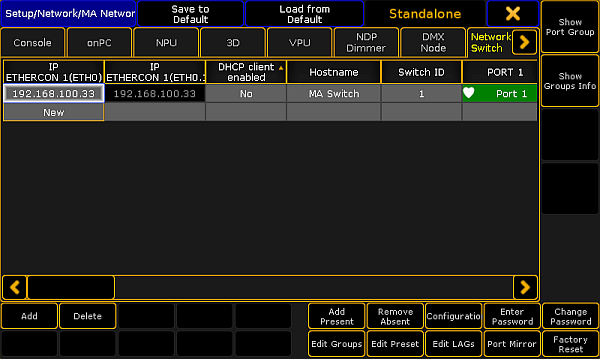
MA Network Configuration - Network Switch
-
Tap and hold the cell in the column Switch ID or tap in the cell and press the screen encoder until the Calculator opens.
-
Enter the new switch ID, for example 2.
-
Press Please.
The MA Network Switch has a new ID. The new ID is saved in the startup configuration.