Using the Shapers Dialog
The Shapers dialog is part of the Special Dialog window and provides a graphical user interface for controlling shaper attributes in fixtures. The values that are used to visualize the shapers come from the DMX layer. For more information, see Fixture Sheet and Layouts.
Watch the following video to get an overview of the Shapers dialog feature.
Requirements:
- A fixture type with a shaper is selected in the programmer, for example, Ayrton Eurus. For more information, see Import Fixture Types and What is the Programmer.
To open the Shapers Dialog window:
- Open the Add Window dialog.
- Tap Common and Special Dialog. The Special Dialog window opens.
- Tap the Shapers tab on the left. The Shapers dialog opens.
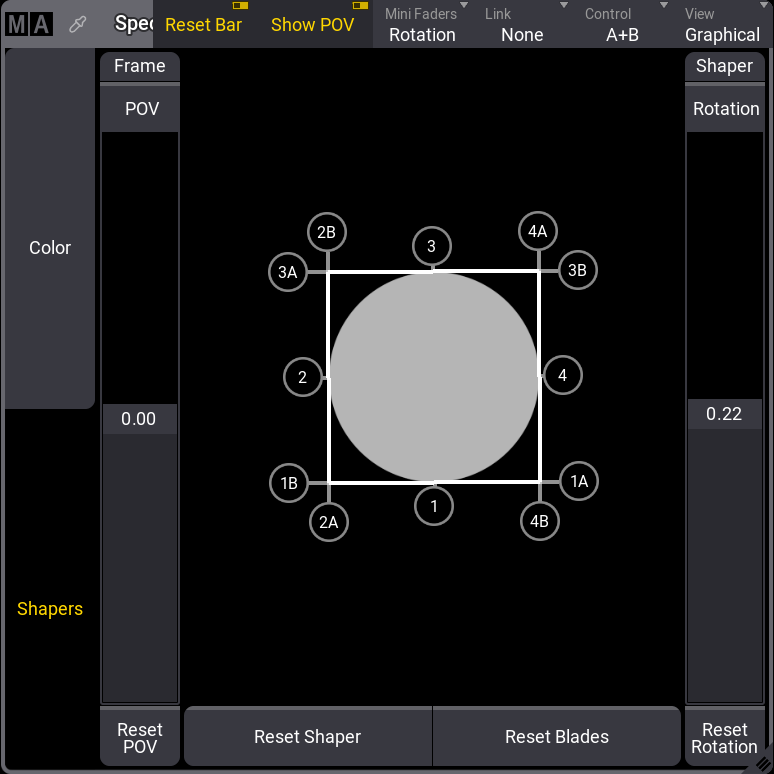
Shapers Dialog window
The title bar of the Shapers Dialog provides the following options for controlling blades and shapers of fixtures. For more information about how to edit the title bar, see Title Bar Configuration.
-
Reset Bar: When enabled, tapping Reset Shaper resets blades and rotation. Tapping Reset Blades resets the blades only.
-
Show POV: Displays a fader to manually rotate the Point of View (POV) of the fixture. When enabled, a Reset POV button is also displayed.
-
Mini Faders: Changes the number of faders that are displayed. Can be accessed by tapping and holding Mini Faders.
- None: No faders are displayed.
- Full: The faders for blades and rotation are displayed depending on the value of Control.
- Blades: The faders for blades are displayed depending on the value of Control.
- Rotation: A fader for the shaper rotation is displayed.
-
Link: Defines how the movement of one or more blades works together.** **
- None: Each blade can be controlled individually.
- All: Moving one blade moves all other blades proportionally.
- Parallel: Moving one blade will also move the opposite blade.
- Mirrored: Moving one blade will mirror the opposite blade.
-
Control: Changes the control mode.
- Ins+Rot: The depth of insertion (1-4 -“I”) and the blade rotation (1-4-”R”) can be defined.
- A+B: The blade corners (A,B) can be defined.
 | Hint: |
| The software converts different types of shaper engines to the correct DMX values so that all modes can be used regardless of the fixture type. Blade misconfigurations are shown in the Conflicts in Fixture Types. |