UPS Battery
The grandMA3 full-size, grandMA3 light, and their CRV versions all have rechargeable lithium-ion batteries for an uninterrupted power supply (UPS).
The purpose of the battery is to enable saving the show file and shutting down the console in case of a power loss.
 | Restriction: |
| Do not use the battery to bypass the console for a longer period! Do not move the console around while in UPS mode! |
In case of a power loss:
- A Power Loss pop-up appears on every screen and command screen, depending on the console type.
- The power status icon in the command line turns red.
Power Status
Section titled “Power Status”There is an indicator of the power status on both the command line and in the Message Center.
Status indications include the following states:
 Power is connected, and the battery is full.
 Power is connected, and the battery is not full (and recharging).
 (Pulsating) Power is disconnected and the battery is discharging.
 Indicates a power disconnection for a station in a session. For example, when a grandMA3 onPC station is connected to a console and the console loses power, the icon on the grandMA3 onPC station turns yellow.
 The battery icon is crossed when the station has no battery, for example, grandMA3 onPC.
 | Important: |
| When a device runs in battery mode, the system differentiates between the battery status of your own device and those of other devices in a session. Depending on the configuration, the label beneath the status icon will show either “My”, “My+Ext”, or “Ext” to indicate whether which device is affected. |
Battery Status Pop-Up
Section titled “Battery Status Pop-Up”Tap the power status indicator to open the Battery status pop-up.
The pop-up could look like this:
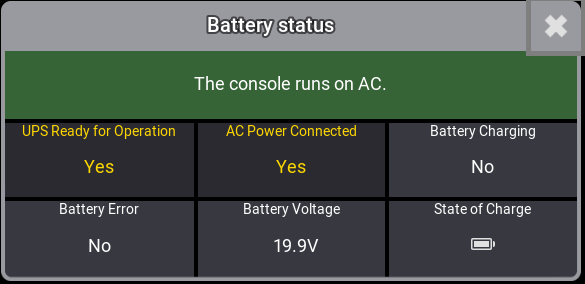
Battery status pop-up
The Battery status pop-up displays multiple relevant metrics for the battery and A/C power.
Power Loss Pop-up
Section titled “Power Loss Pop-up”While this pop-up is open, the percentage in parentheses (X%) decreases continuously. The percentage in parentheses is linked to the battery’s power status.
In the pop-up window, three commands are available to tap:
Save and Shut Down: Saves the current show file and shuts down the console properly.
Shut Down: Properly shuts down the console without saving the show file.
Continue: The console continues running on battery power. Additional Power Loss pop-ups appear during battery discharge. When continued, the console will automatically shut down, reaching (0%). The console reboots automatically when the power supply is back.
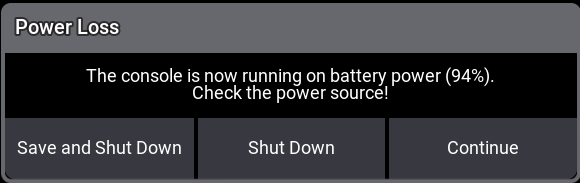
Power Loss - Pop-up.