Open the Help as PDF
You can download PDF files of different versions of the manual as well as single topics.
Download Manual for a Software Version
Section titled “Download Manual for a Software Version”A PDF version of the user manual is available for each version of the software.
To download a PDF of the entire manual:
- Navigate to the Downloads section of the MA Lighting website: https://www.malighting.com/downloads
- Select a product family in the list on the left side.
- Click Offline User Manuals + QuickMAnual.
- For versions other than the latest release, click Archive at the bottom of the list.
- Click on the version of the manual you want to download.
The PDF file is saved to your downloads folder.
[+] Show Image
[-] Hide Image
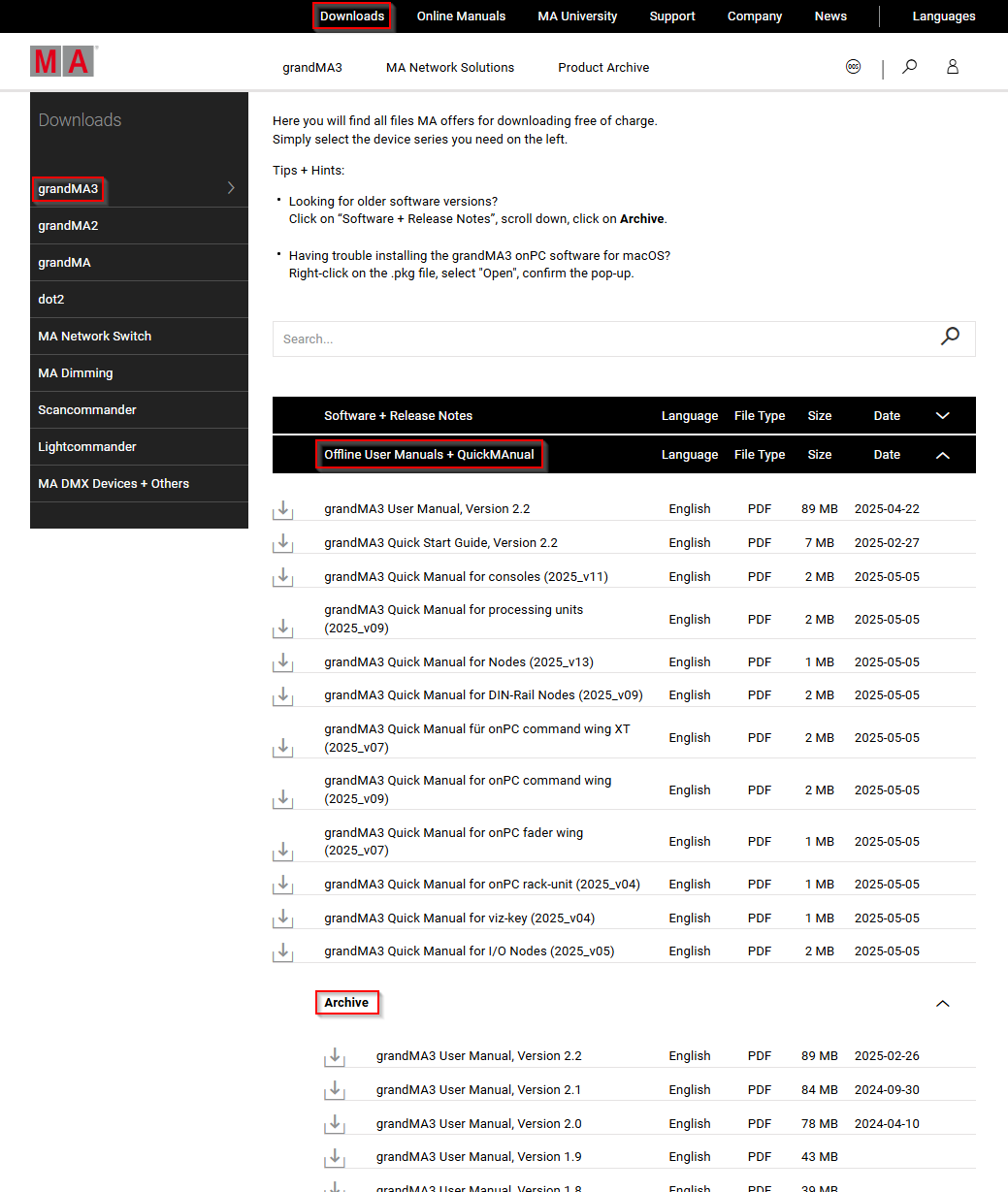
Download section on the MA Lighting website
Create PDFs in the Online Help
Section titled “Create PDFs in the Online Help”Download single topics from the online help as a PDF document to view them offline.
To download the contents of a topic as a PDF file:
- Click the printer icon (
 ) next to the topic title.
 - As destination choose Save as PDF.
- Click Save.
The topic PDF is saved to your downloads folder.