Executor Elements
Executors are used to playback and control elements of a show file in an accessible way. For example, they can be used to control a sequence.
For more information about executors, see the Executors topic.
Objects can be assigned to executors via the user interface of the grandMA3 software. The following menu/window gives access to the executor:
- To open the Playbacks window, in the Add Window pop-up tap Common and Playbacks.
- To open the Playbacks menu, press F5 on the keyboard or tap
 in the control bar.
Depending on the hardware:
- The number of physical executors depends on the console type.
- The executors are handles to control objects in the show file. The executors are located on the left part of the console.
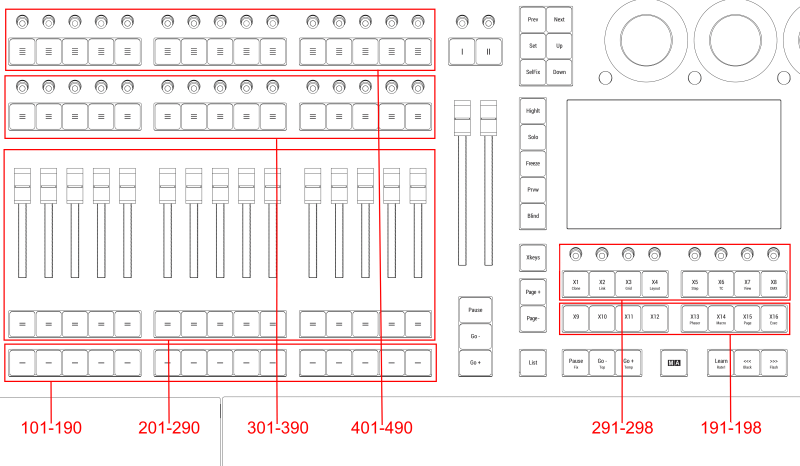
Executor location on large consoles
Executor 101 thru 190
Section titled “Executor 101 thru 190”The executors 101 thru 190 are located as the lower buttons in the executor section. On the hardware keys, these have labeled one horizontal line on top of them. In the Playback Control overlay or the Playback window, they are named by their number.
Executor 191 thru 198
Section titled “Executor 191 thru 198”The executors 191 thru 198 are located as the lower row of Xkeys (X9 to X16 | Exec). For more information see Keys.
Executor 201 thru 290
Section titled “Executor 201 thru 290”The executors 201 thru 290 are located as the second lower buttons and the faders in the executor section. One button and the above fader is one executor. On the hardware keys, these have labeled two horizontal lines on top of them. In the Playback Control overlay or the Playback window, they are named by their number.
Executor 291 thru 298
Section titled “Executor 291 thru 298”The executors 291 thru 298 are located as the upper row of Xkeys (X1 | Clone to X8 | DMX). For more information see Keys.
Executor 301 thru 390
Section titled “Executor 301 thru 390”The executors 301 thru 390 are located as the second upper buttons and knobs in the executor section. One button and one knob is one executor. On the hardware keys, these have labeled three horizontal line on top of them. In the Playback Control overlay or the Playback window, they are named by their number.
Executor 401 thru 490
Section titled “Executor 401 thru 490”The executor 401 thru 490 are located as the upper buttons and knobs in the executor section. One button and one knob is one executor. On the hardware keys, these have labeled four horizontal line on top of them. In the Playback Control overlay or the Playback window, they are named by their number.