To enter the **Next **keyword in the command line, use one of the options:
- Press Next or MA +
- Type Next
- Type the shortcut N
 | Important: |
| To execute the command directly, press Next. |
Description
Section titled “Description”If no fixtures are selected and the default keyword is Fixture, the Next keyword selects the fixture with the lowest fixture ID.
If only one fixture is selected and the default keyword is Fixture, the Next keyword selects the following fixture.
If multiple fixtures are selected, the Next keyword selects the following fixture one after the other within the selected block of fixtures.
For more information see MAtricks and Shuffle.
| Important: |
| The logic of object-related operations was extended using the Next keyword. For more information see the Store keyword and the Update keyword. |
Syntax
Section titled “Syntax”Next
Option Keywords
Section titled “Option Keywords”The Next keyword uses the following option keywords:
Examples
Section titled “Examples”- To step through single fixtures in the selected block of fixtures, press Next.
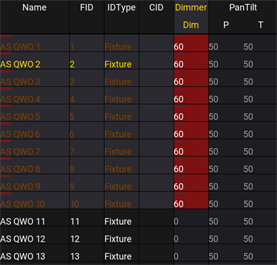
Using Next in a selected block of fixtures
- To go to the next page in the page pool, type:
 | User name[Fixture]>Next Page |
- To load the next cue in selected sequence, type:
| User name[Fixture]>Load Next |