Create a World
Worlds are created in the programmer and stored in the world pool.
Worlds may be thought of as matrix with rows (fixtures) and columns (attributes), and being in a world may block programmer access to rows and/or columns in sheets.
The created world will contain the rows of the current fixture selection and the columns of any active attribute. All columns/attributes are included in the created world if no attributes were active. If no fixtures were selected, then all fixtures are a part of the world. If a world, other than World 1 is selected, a world icon ( ) is displayed in the title bar of sheets and windows that are affected of the world selection. Additionally, the status is displayed in the command line with the number of the selected world, if the status is set to On Activity in the Status Center.
Worlds from the world pool can also be used for sheet masking. For more information read the Sheet Masking topic.
Examples
Section titled “Examples”Requirement:
Have a world pool and fixture sheet visible on a screen.
Create a World with Fixture 1 to 5
Section titled “Create a World with Fixture 1 to 5”- Clear the programmer.
- Select fixtures 1 thru 5 (or any 5 fixtures in your show).
- Press Store followed by an empty world in the World Pool.
- Tap the newly created world.
Now there is only programming access to fixtures 1 thru 5, reflected by the fixture sheet. All attributes are available.
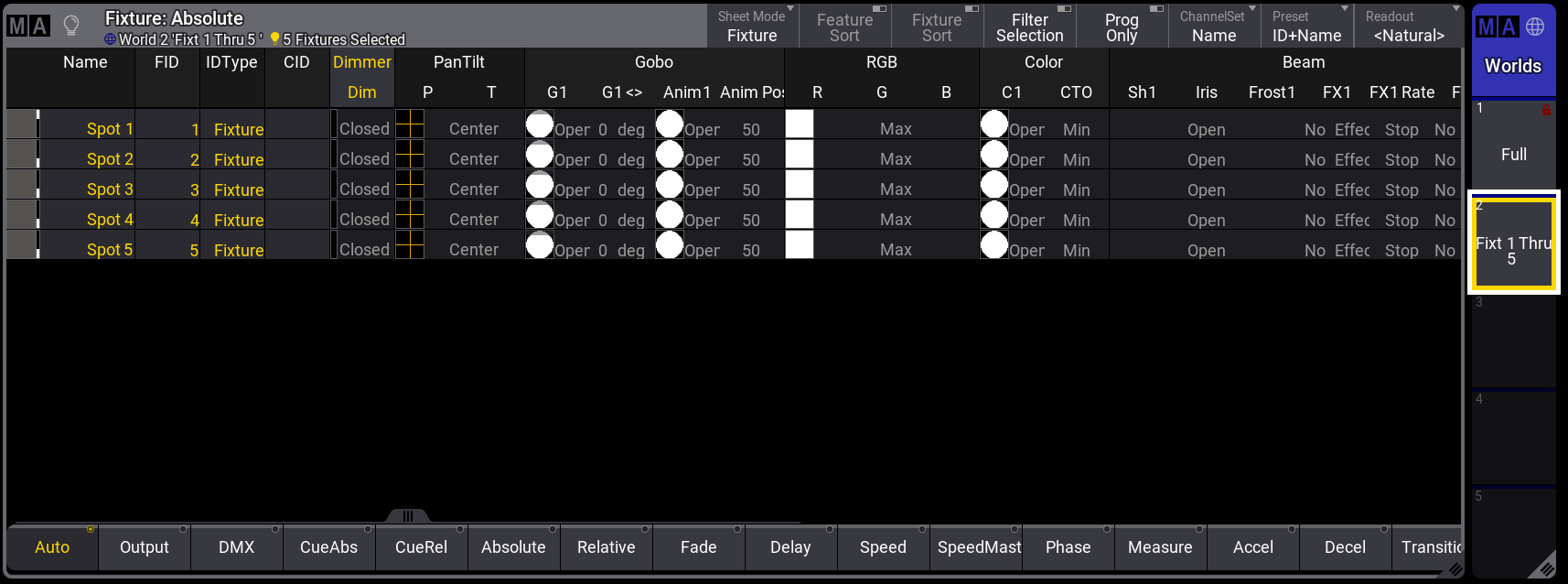
Fixture sheet with World named “Fixt 1 Thru 5” active.