Encoder Bar Pool
The Encoder Bar Pool can be used to create customizable encoder bars. The customization can be made in an editor, for example, defining the functionality per encoder, and defining the number of encoder banks and their encoder objects.
To always have a backup with the original feature group structure, the encoder bar pool object 1 is set as default and can not be deleted or edited, as it is system locked. For more information, read the Feature Group Control Bar topic.
 | Hint: |
| Copy the default encoder bar to an empty pool object to use it as a template. Simply press Copy, tap the default encoder bar pool object and then tap an empty pool object. |
When tapping on a pool object, the Encoder Bar and the Encoder Bar window change the user interface according to the settings previously made for those pools.
- To address Encoder Banks and Encoder Pages directly, use the EncoderBank Keyword.
- To switch between encoder bars, use the EncoderBar Keyword.
Encoder Bar Structure
The following graphic and the numbered list displays the basic structure and terminology of the encoder bar:
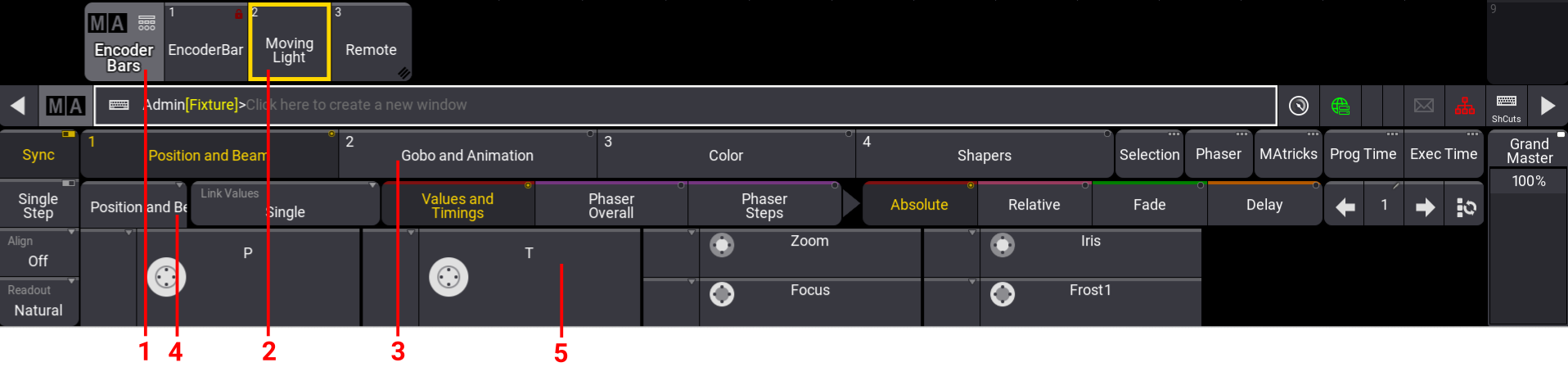
- Encoder Bar Pool: This pool contains all the encoder bar pool objects. Each user profile has its own encoder bars pool.
- Encoder Bar Pool Object: A pool can have several pool objects. For more information on how to setup pool objects, see** Pool Windows. **
- Encoder Bank Button: There can be several encoder banks inside an encoder bar pool object. Allows you to link to Special dialog tab.
- Encoder Page: Each encoder bank can have several encoder pages. Encoders get arranged in Encoder Pages.
- Encoder: An encoder page can contain up to five dual encoders.
Create New Encoder Bar Pool Object
Section titled “Create New Encoder Bar Pool Object”To open the Encoder Bars pool:
- Open the Add Window dialog.
- Tap Pools and then tap Encoder Bars. The Encoder Bars pool is open.
To create a new Encoder Bar Pool object:
- Press Edit and tap an empty encoder bar pool object. A pool object is added and the Encoder Bar editor opens.
To copy the default encoder bar pool object to an empty pool object:
- Press Copy, tap Encoder BarPool Object 1 and then tap an empty encoder bar pool object in the Encoder Bars Pool.
To assign an Encoder Bar pool object to a ViewButton:
- Press Assign, tap an encoder bar pool object, and then tap an empty view button.