IfOutput
Section titled “IfOutput”Pressing If enters the IfOutput keyword into the command line.
 | User name[Fixture]>IfOutput |
For more information about IfOutput, see the IfOutput keyword.
IfActive
Section titled “IfActive”Pressing If If enters the IfActive keyword into the command line.
| User name[Fixture]>IfActive |
For more information about IfActive, see the IfActive keyword.
IfProg
Section titled “IfProg”Pressing If If If enters the IfProg keyword into the command line.
| User name[Fixture]>IfProg |
For more information about IfProg, see the IfProg keyword.
Pressing If If If If enters the If keyword into the command line.
| User name[Fixture]>If |
For more information about If, see the If keyword.
Pressing If again once the If command is already in the command line enters the EndIf keyword into the command line.
| User name[Fixture]>Store If Group 5 EndIf Preset 1.1 |
For more information about EndIf, see the EndIf keyword.
Location
If is located in the numeric keys section.
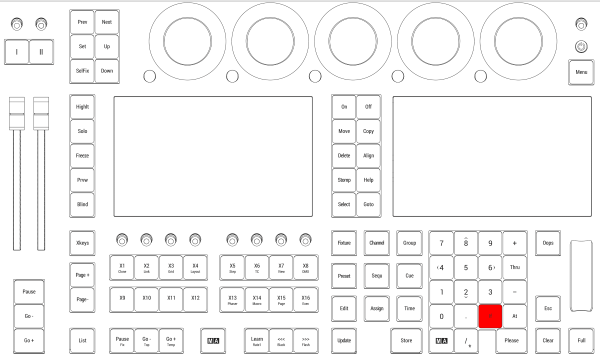
Location on grandMA3 full-size and grandMA3 light consoles
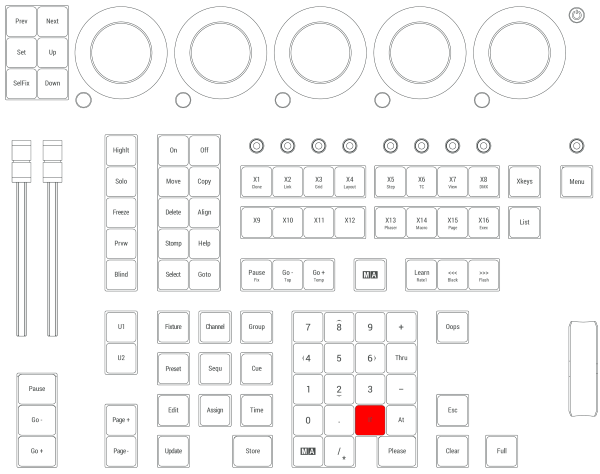
Location on grandMA3 compact consoles and grandMA3 onPC command wing