Pressing At enters the At keyword into the command line.
 | User name[Fixture]>Fixture 17 At 30 |
For more information about At, see At keyword.
Normal
Section titled “Normal”Pressing At At executes the Normal keyword in the command line in the selected fixtures.
| OK : | Normal |
For more information, see Normal keyword.
Integrate
Section titled “Integrate”Pressing and holding MA + At enters the Integrate keyword into the command line.
| User name[Fixture]>Integrate |
For more information about Integrate, see Integrate keyword.
Extract
Section titled “Extract”Pressing and holding MA + At + At enters the Extract keyword into the command line.
| User name[Fixture]>Extract |
For more information about Extract, see Extract keyword.
At Filter Menu
Section titled “At Filter Menu”Pressing and holding At opens the At Filter menu.
Location
Section titled “Location”At is located in the numeric keys section.
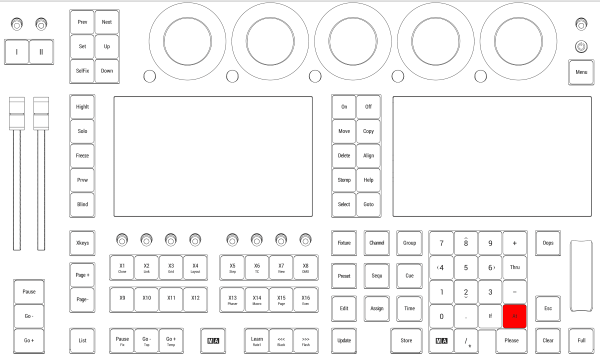
Location on grandMA3 full-size and grandMA3 light consoles
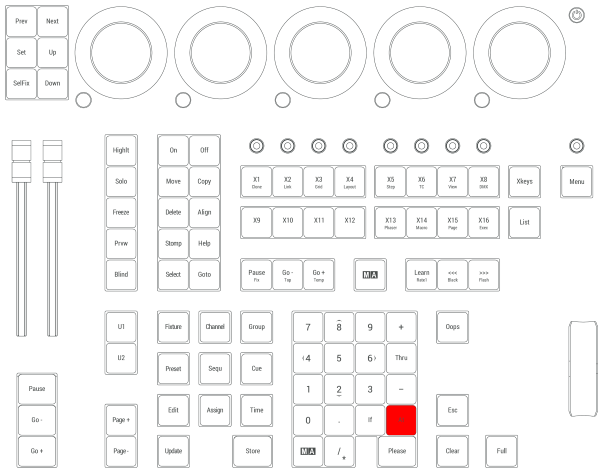
Location on grandMA3 compact consoles and grandMA3 onPC command wing