The default functionality of Time depends on the “Time Key Target” setting in the current user profile.
If the “Time Key Target” is set to “Cue” and the command line is empty, pressing Time will toggle between CueFade and CueDelay in the command line.
 | User name[Fixture]>CueFade |
For more information about Time, see the CueFade keyword or CueDelay keyword.
If the “Time Key Target” is set to “Cue” and the command line contains a fixture selection, pressing Time will toggle between Fade and Delay in the command line.
| User name[Fixture]>Group 1 Delay |
For more information about Time, see the Fade keyword or Delay keyword.
If the “Time Key Target” is set to “Fixture” and the command line is empty, pressing Time will toggle between Fade and Delay in the command line.
| User name[Fixture]>Delay |
For more information about Time, see the Fade keyword or Delay keyword.
If the “Time Key Target” is set to “Fixture” and either Store or Cue is in the command line, pressing Time will toggle between CueFade and CueDelay in the command line.
| User name[Fixture]>Store CueFade |
For more information about Time, see the CueFade keyword or CueDelay keyword.
Regardless of the “Time Key Target” setting, pressing MA Time will toggle between Relative, Fade, Delay, and Absolute.
| User name[Fixture]>Relative |
For more information about Time, see the Relative keyword, Fade keyword, Delay keyword, or Absolute keyword.
Regardless of the “Time Key Target” setting, additionally adding At to the command and pressing Time will cycle through the value layer keywords.
Example: At 5 0 Time
| User name[Fixture]>At 50 Fade |
Location
Section titled “Location”Time is located in the command section.
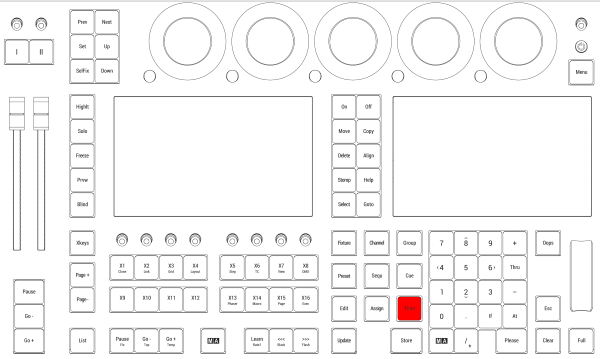
Location on grandMA3 full-size and grandMA3 light consoles
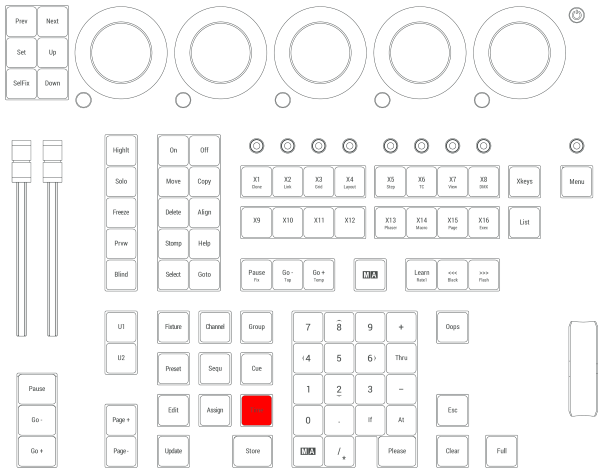
Location on grandMA3 compact consoles and grandMA3 onPC command wing