Backup, Demo, and Template Show Files
Show files are categorized into multiple folders. Shows is where the regular saved show files are stored, in Backup Shows a show file is automatically generated when saving a show file. Demo Shows are the predefined show files by MALighting, and in Template Shows predefined show files can be added by the user.
To load a backup file, a demo show file, or a template show:
- Open the Backup Menu and tap Load.
- Tap Shows to toggle between Shows, Backup Shows, Demo Shows and Template Shows.
- You can load a previously saved backup or a demo show.
 | Restriction: |
| It is not possible to save or create a new show file in the Backup Shows, Demo Shows, or Template Shows folder. |
-
Up to 10 backup files can be stored from the same show file. A backup is automatically generated when saving a show file.
-
The name of a backup show file contains:
- Showfile Name
- Backup
- Date and Time in UTC format
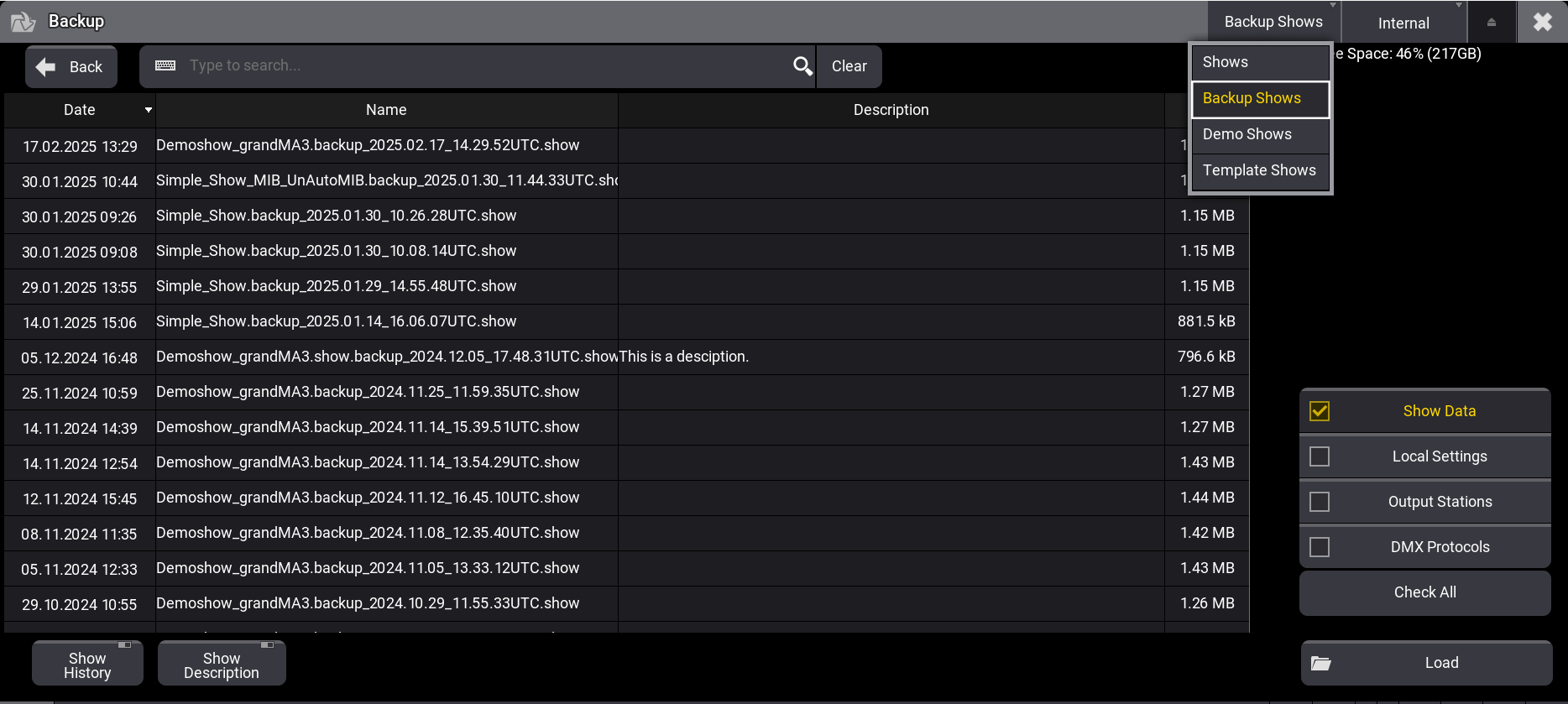
Backup Files
Template Shows
Section titled “Template Shows”To display show files in the Template Shows folder, the show file need to be placed manually into a specific folder in the library of the local device. For more information, see Folder Structure.
To place an already saved show file into the template show folder on a grandMA3 console, use an external SFTP client. For more information, see SFTP Connection to a Console .