Create a World
Worlds are created in the programmer and stored in the world pool.
Worlds may be thought of as matrix with rows (fixtures) and columns (attributes), and being in a world may block programmer access to rows and/or columns in sheets.
The created world will contain the rows of the current fixture selection and the columns of any active attribute. All columns/attributes are included in the created world if no attributes were active. If no fixtures were selected, then all fixtures are a part of the world.
Worlds from the world pool can also be used for sheet masking. For more information read the Sheet Masking topic.
Examples
Section titled “Examples”Requirement:
Have a world pool and fixture sheet visible on a screen.
Create a World with Fixture 1 to 5
Section titled “Create a World with Fixture 1 to 5”- Clear the programmer.
- Select fixtures 1 thru 5 (or any 5 fixtures in your show).
- Press Store followed by an empty world in the World Pool.
- Tap the newly created world.
Now there is only programming access to fixtures 1 thru 5, reflected by the fixture sheet. All attributes are available.
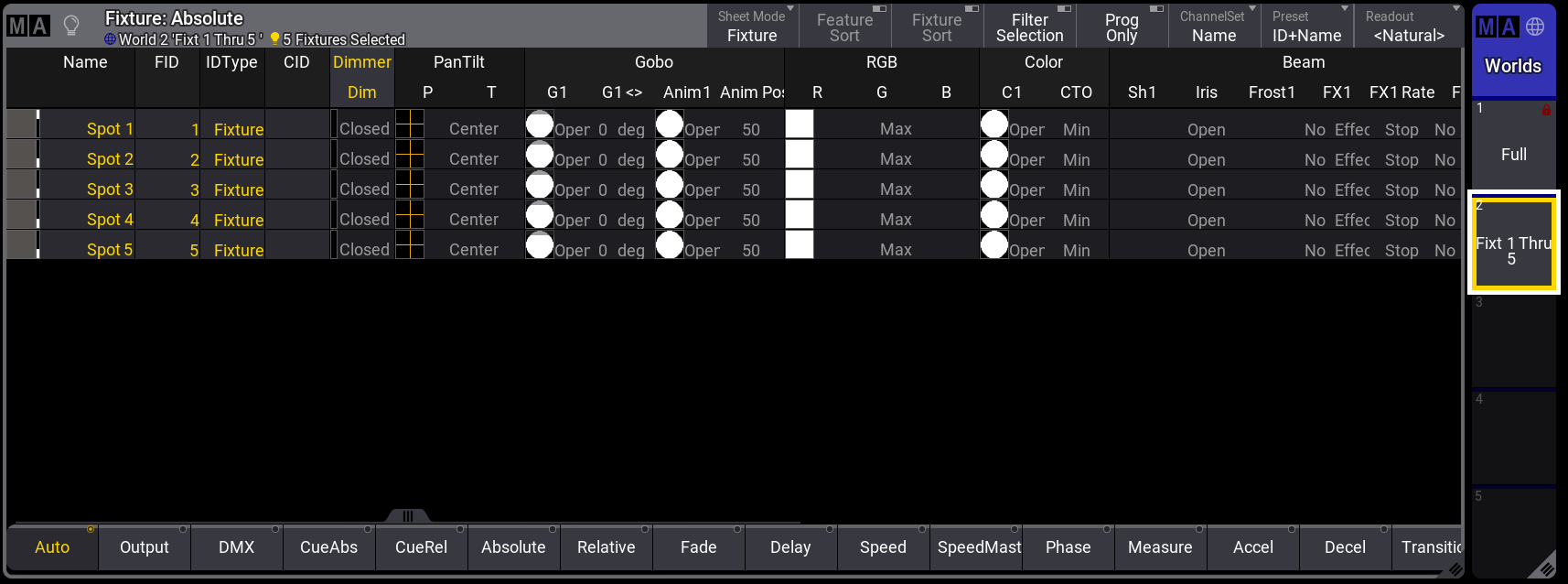
Fixture sheet with World named “Fixt 1 Thru 5” active.